CueSync fires your show's cues — lights, video, playback — from the music, a timecode or your GO, on the gear you already use. Works with rekordbox, grandMA3, Resolume, QLab and Unreal. Replaces none of them.
DJ follows the music. Theatre runs a cue list on timecode or your GO. Production does both in one show file.
macOS 12+ · Apple silicon · Free account, no card · Live output needs a paid edition
Screen capture · v1.0.35 · Run Mode
CueSync's Run Mode running a theatre show, from the status bar to the running order: RUNNING in SHOW mode, Scene 2 with 0:37 left, timecode locked to LTC at 25 fps; the standby band for LX cue 1.2 'Act I build 2' at 00:01:04:00 with FIRE and eight more behind it; the RUN clock at 00:01:11:00 with TC OUT · MASTER and Hold TC; the NEXT card for cue 1.2, routed to GMA3 page 1.1 cue 1.0, with a twelve-second countdown and the stage manager's note to hold for the call; the LX and VX rows, each with its last and standby cue; and the running order with the cues that just went (GONE, LAST) above NEXT, and cues 1.2, 2.2 and 3.2 — LX, VX and SFX — all standing by for 00:01:04:00.
By the job
What are you running tonight?
Pick the job you do on the night. Each one opens the page written for it, with the edition that runs that flow.
Each job carries the edition whose flow it is. DJ follows the music, Theatre runs a cue list on timecode or your GO, and Production runs both in one show file. Pads and GO are in all three.
Three editions
Three ways to run a show.
Every edition reaches every output: lighting, video, playback, lasers and game engines. Choose the one that matches what sets the pace of your show.
DJ
The show follows the music.
1Load your own tracks, or connect your Pioneer CDJs.
2Each track’s moments are planned from its phrases and drops, and the hot cues and loops you set in rekordbox come across with a Pioneer track.
3Play. The rig follows the phrase, and pads land on the next beat, bar or phrase.
4Take any moment back with GO, or hold and skip from a Stream Deck.
A track playing from Local Audio over its cue stack: the cue that is live, the one that is next, and GO.CueSync's Cues screen on a Production licence, rendered by the shipping app with its demo show playing from Local Audio: the Neon Skyline waveform with its cue markers, above an eleven-cue stack whose filter row counts the cues by trigger — beat, position, phrase, manual and hot cue — with each row carrying its trigger chip (an energy one among them) and the consoles it fires (grandMA3, Resolume, Unreal Engine, QLab), cue 2 Build Strobe live and cue 3 DROP Blinder next over a GO button bound to the space bar; and beside it the Output Status panel reading 3 of 4 healthy · 1 unreachable, with grandMA3, QLab 5 and Resolume Arena at 100% and Unreal Engine connected but answering nothing, marked NO REPLY.
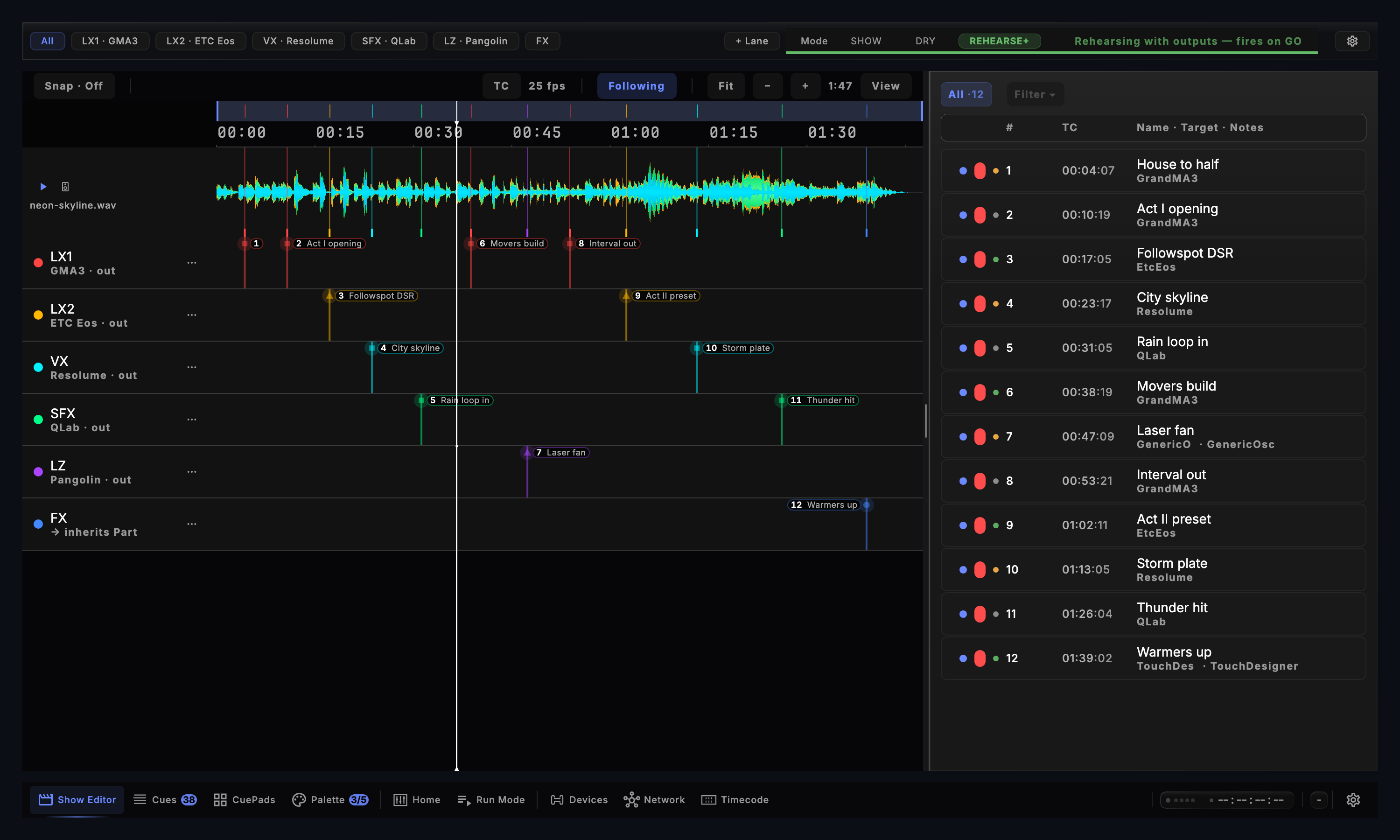
Screen capture · v1.0.35 · Show Editor
The cue list above six routed lanes on one timecode-ruled timeline, in rehearsal with outputs.CueSync's Show Editor with its cue list placed beside the timeline: the lane filter with LX1, LX2, VX, SFX and LZ chips and a + Lane control beside the SHOW / DRY / REHEARSE+ switch, set to REHEARSE+ and reading 'Rehearsing with outputs — fires on GO'; the timeline in the centre — Snap, TC at 25 fps, Following, a ruler from 00:00 to 01:30 over the master waveform of neon-skyline.wav, and six output lanes each naming its console target (GMA3, ETC Eos, Resolume, QLab, Pangolin, and one inheriting its Part's routing) with twelve cues placed across them; and on the right the cue list, All · 12, each cue on two lines with its readiness dot, number, timecode, name and the target it fires.
Screen capture · v1.0.35 · Decks
The decks view: the master deck on air and in sync over its phrase-banded waveform, the next track cued and synced. Production reads the decks and runs the scripted show from the same file.CueSync's decks view, rendered by the shipping app with its demo show: the master header reading MASTER · CDJ-1 at 128.00 BPM, +0.0%, with SYNC and both connected decks at 128.0; deck 1, a CDJ-3000 marked MASTER, ON AIR and SYNC, playing Neon Skyline (Melodic Techno, 8A, 1:47) over a waveform banded by phrase from intro to outro and reading IN SYNC at 1.2 ms; deck 2, also a CDJ-3000, cued on Midnight Drive at 128.0 in 9A and already synced; and the navigation bar beneath with Pro Decks selected.
On show night
It runs the show. Your work stays yours.
Cues land where the show is.
A cue fires because the show arrived somewhere: a drop, a phrase, a timecode, the stage manager’s GO. Not because a fixed number of beats went by.
Screen capture · v1.0.35 · Track PrepDJ and Production · each suggested cue named for its moment, with the reasonCueSync's Track Prep screen on its Suggestions tab, rendered from the shipping app with the demo plan: Suggested Cues with Keep All and Dismiss All, and four suggestions — First Drop Blinder (high impact, on the first drop: 'Energy peak after the build — fire the blinders.'), Pre-Drop Strobe (at the build start: 'Riser detected — ramp strobe into the drop.'), Breakdown Wash (at the breakdown: 'Energy dip — soft warm wash.') and Final Drop (high impact: 'Loudest section — full rig.') — the two high-impact ones kept, each with its keep and dismiss controls.
Your desk keeps its programming.
See every command before it is sent. Your desk keeps its cue numbers, and each lane can go across as its own sequence, with one Timecode object calling them all.
Screen capture · v1.0.35 · Sync to grandMA3Theatre and Production · every command, before anything is sentCueSync's Sync to grandMA3 dialog, cropped to its preview card for one sequence: 'First push → sequence 900 "Act I"' with +13 added, ~0 updated and 0 unchanged; '40 commands' in a numbered list — Store, Label and a CueFade for each of cues 1.0 to 7.0 — that the console will receive; the readiness chips for the console, the bridge, sequence 900, overwrites and the desk's programmer; the line 'Preview — nothing is sent until you explicitly Send and confirm.'; and the Send to grandMA3 button.
Your work leaves with you.
Cue sheets as PDF, HTML, CSV and Markdown that open without CueSync, for everyone who reads the show.
The cue sheets CueSync exports, and who each one is for
Document
For
Operator cue list
Every cue, in running order
Department sheet
One department's cues
Lighting · Media · Sound
A list for each desk
Calling script
The stage manager's book
Running order
The director's page
Every edition · PDF · HTML · CSV · Markdown
You can take it back.
Rehearse with or without outputs. Back, Pause and Stop each take a double-press, and panic blacks the rig out and holds it there.
Screen capture · v1.0.35 · Run ModeTheatre and Production · Back, Pause and Stop each take a double-pressCueSync's Run Mode, cropped to its transport row: Back, Pause and Stop, each marked double-press so a stray tap cannot fire them, the SHOW / DRY / REHEARSE+ mode switch with 'pause to change', and the GO button marked '[SPACE] double-press'.
Single-purpose tools each cover one slice: DMX from a DJ app, lights from timecode, cue playback. CueSync sits between the performance and all of them: one cue reaches the desk, the media server, playback and the lasers together, from the booth or from the call. Every output, in every edition. See how it compares.
Beyond the operator
Everyone on the show sees the same cue.
Backstage
TheatreProduction
A cue light and countdown on every tablet. Each department sees its current and next cue, and the stage manager’s STANDBY and GO.
Crew board · a link per department
Scan a code on the venue Wi-Fi · nothing to install
A Stream Deck, a Launchpad or any MIDI controller drives your pads directly: plug it in, switch it on in Settings, and no other software is needed.
Unreal Engine
Your show, inside Unreal Engine.
The free plugin follows your cues and your timecode, so the virtual stage runs on the same show as the real one. RigSync and three fixture packs build and light the rig.
Free on Fab · Unreal Engine 5.8 · driven by the CueSync app on a Mac